
How to Delete Your Account
If you no longer wish to use Approach, you can permanently delete your account from inside the app.
Steps
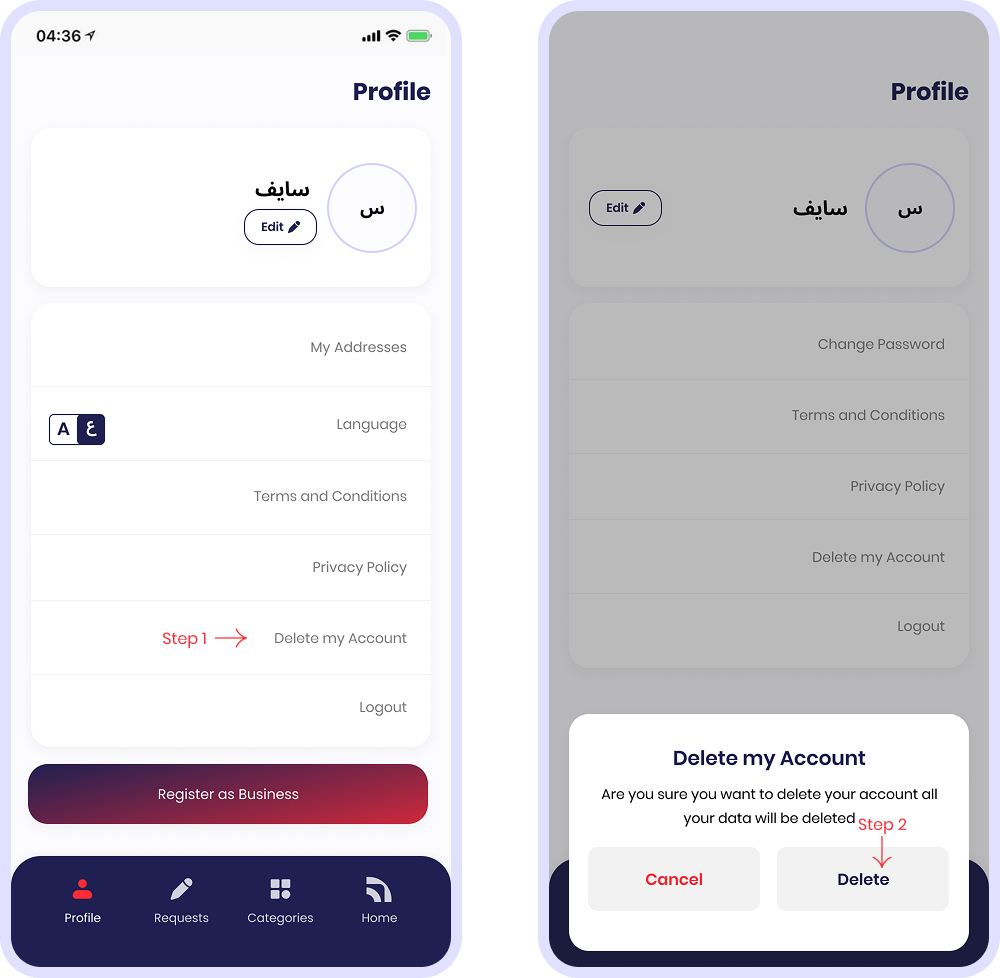
- Open the app and go to Profile.
- Tap Delete My Account.
- Confirm by tapping Delete in the popup.
Instant Request
Privacy First
Support Available
What Happens Next
- Your account is deactivated immediately.
- Your profile becomes inaccessible.
- Deletion is processed according to applicable laws and internal retention requirements.
Data Deletion & Retention
We delete or anonymize your personal data where possible. Certain information may be retained for a limited period if required to: comply with legal obligations, prevent fraud, resolve disputes, or enforce our policies.
Need Help?
If you can’t access the app or need assistance deleting your account, contact us:
For more details, please review our Privacy Policy and Terms and Conditions.